Intake Pace and Maximum Concurrent Bookings
There are two limits on how many bookings you accept. The intake pace keeps bookings from bunching up in one time band, as in "no more than this many parties in the 19:00 hour". The maximum concurrent bookings is the limit per slot. They serve different purposes, so you can set only the one you need or combine both.
Intake pace
Even when tables are free, too many arrivals in a short time can be more than your staff can handle. Setting a limit on parties and guests per time band helps you avoid that rush. Use it right after opening in a restaurant, or at the lunchtime peak.
Whether this setting appears depends on your business type. Restaurants, izakaya and fast food stores see it from the start. For other business types it is hidden by default, but once you turn it on it stays visible.
How to set the intake pace
- In Reservations, open "Setup" and choose "Reservation settings"
- In the "Advanced" tab, open "Intake pace"
- Turn on "Limit how many bookings start at once"
- Choose the "Time bucket" (15, 30 or 60 minutes; the default is 15). With 15 minutes, 19:00 to 19:15 is one bucket
- Use "Add a pace rule" to register limits for each day and time band
- Choose "Save" at the bottom of the screen
Pace rule fields
- Days: The days of the week the rule applies to
- Start and end time: The time band the rule applies to
- Parties: The maximum number of bookings accepted in each bucket
- Covers: The maximum number of guests accepted in each bucket
- Stay time: How long bookings in that time band hold the table. If left blank, the slot's own duration is used. This is where you express differences such as lunch turning over in an hour while Saturday night does not
- Label: Optional. You can give the rule a name that shows what it is for, such as "Fri/Sat dinner"
Rules are checked from the top down, and the first one that matches applies. A 0 in Parties or Covers means "no limit".
What counts towards the limit
As well as bookings that are holding a table, bookings you have recorded as visited also count, because those guests are still in the store.
Maximum concurrent bookings (per slot)
This one is not in "Advanced" but under "Basic settings" in the "Hours & slots" tab. It is not limited by business type and appears for every store.
- Slot duration (minutes): How long one slot lasts
- Max concurrent bookings: The most bookings allowed in the same slot. Enter a number of 1 or more
- What the limit counts: Choose whether the limit counts bookings or seats
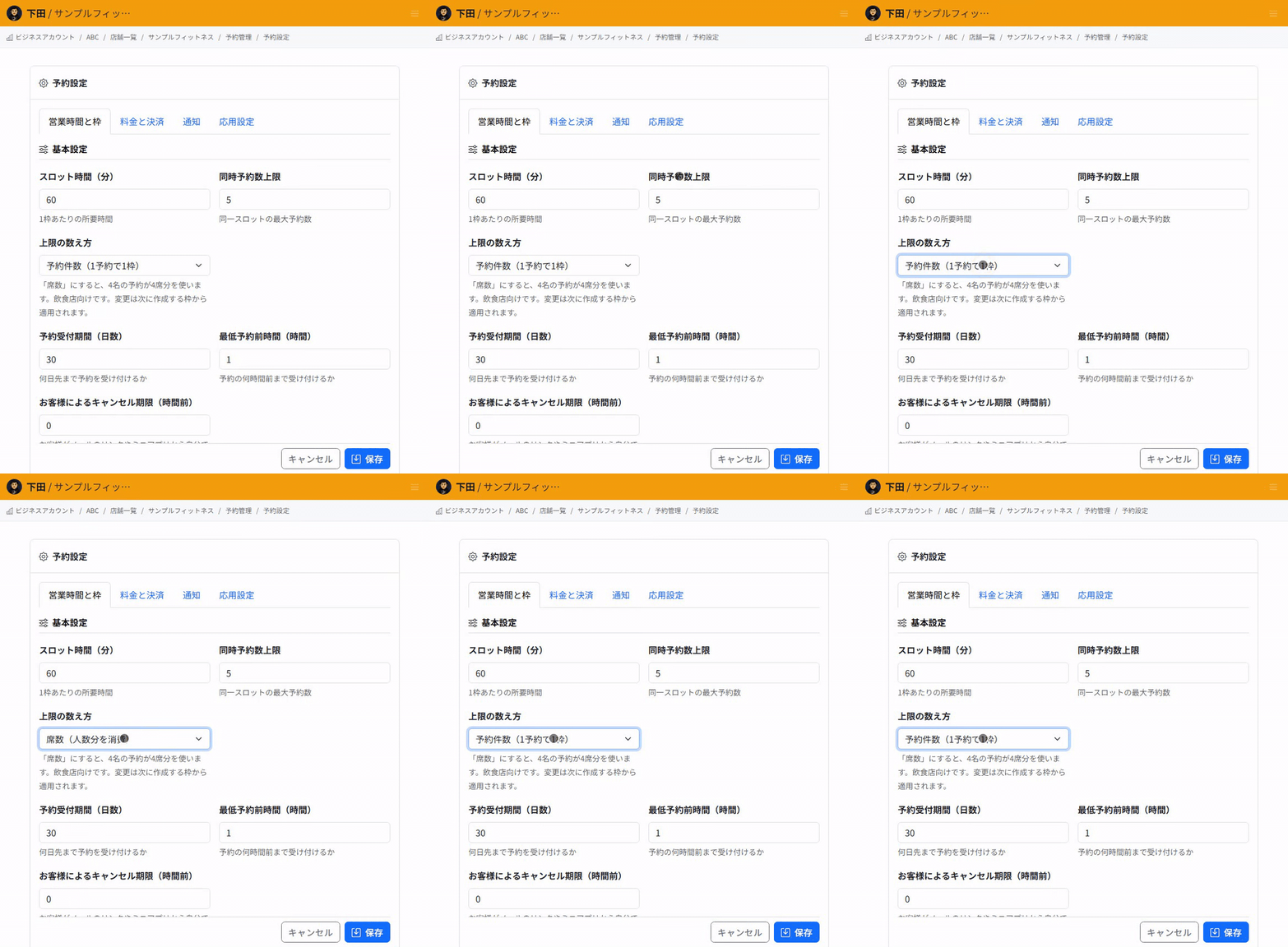
Choosing what the limit counts
Even with the same limit of 3, the number of guests you can take changes depending on what is counted.
- Bookings (each reservation takes 1): Each booking uses one place, whatever the party size. With a limit of 3, you take up to 3 bookings
- Seats (each reservation takes its party size): Each booking uses as many places as it has guests. A party of 4 uses 4. This is the option for restaurants
When the limit is reached
A slot that has reached its limit is treated as full, and no new bookings can be taken at that time. Customers are told that the time is full and asked to choose another time.
If you count by Seats, a slot may still have room left but not enough for the party size. In that case customers are told there is not enough room for their party at that time and asked to change the party size or time. A slot that could not fit a party of 6 may still fit a party of 2.
Changes to maximum concurrent bookings apply to slots created next
The maximum concurrent bookings and what it counts are written into each slot when the slot is created. If you change the setting, slots that already exist keep the limit they were created with. The change takes effect from the next slots you create.
The intake pace is not written into slots, so once you save it, it is used to check all bookings made after that.
Related articles
-
Booking Menus and Service DurationsHow to set a duration for each booking menu item so customers are only offered times when that much time is free in a row. Covers buffer time, choosing which staff can take an item, visibility (Public, Link only, Members only) and who counts as a member.
-
Editing the Booking PageHow to edit the welcome message, cancellation policy and notes shown on your customer-facing booking page, where each one appears, and what to write to cut down on questions.
-
Charging No-Show FeesHow to charge a cancellation fee to customers who do not show up. Covers the card-on-file setting, when the charge is made, and why a charge may not go through.
-
Staff Nomination SettingsHow to let customers choose a staff member before they book. Covers adding a nomination fee, what customers see on the booking page, and why staff must be registered first.
-
Setting Up Deposits and PrepaymentHow to take a deposit or full prepayment at the time of booking. Covers the four payment options, the Stripe connection you need first, what customers see, and what to check before you go live.