Staff Nomination Settings
Customers can choose a staff member first, then see that person's free times and book. This setting is for businesses where customers come to see a particular person, such as hair salons, nail salons and bodywork clinics. It is off by default.
Register your staff first
Customers can choose from the people registered as staff in your store's layout. If no staff are registered, the option to choose a staff member does not appear.
Staff working days come straight from shift management. No slots are created for a person on days they are not on shift, so you do not need to manage each person's schedule separately.
How to turn it on
- In Reservations, open "Setup" and choose "Reservation settings".
- Open the "Pricing & payment" tab.
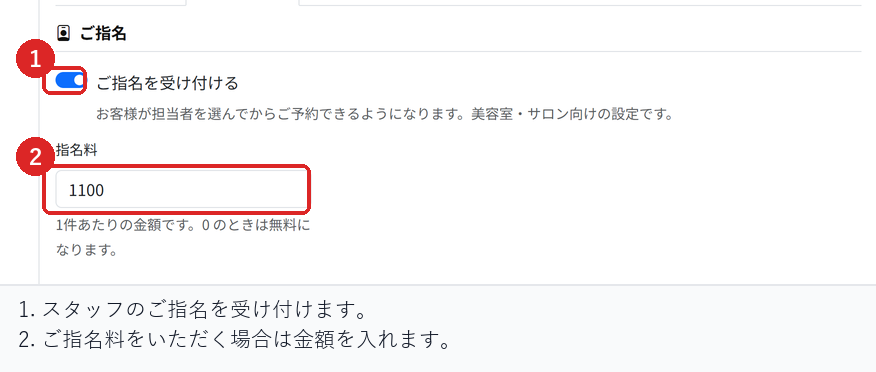
- Under "Nomination", turn on "Let customers choose their stylist".
- If you charge a nomination fee, enter the amount. Leave it at 0 for no charge.
- Choose "Save" at the bottom of the screen.
What customers see
Your public booking page shows "Choose who serves you", and customers pick a staff member before the calendar. Once they choose someone, only that person's free times are shown.
Customers can also choose "No preference". In that case no nomination fee is added, and the booking goes to whichever staff member is free.
If you set a nomination fee, it is added to the total as soon as the customer chooses a staff member, and shown before they confirm the booking. The fee is charged once per booking. It does not change with the number of people.
After a booking is made
For bookings made with a nomination, the staff member is recorded in the reservation details. You can see each person's bookings together in "Bookings by staff".
Check before you go live
On your public booking page, check that the list of staff appears, that the times shown change when you choose a staff member, and that no nomination fee is added when you choose "No preference".
If you set a nomination fee, check that it is included in the total before confirming. After booking, also check that the staff member is recorded in the reservation details.
Related articles
Booking Menus and Service Durations / Instructor Schedules and Booking Slots / Editing the Booking Page
-
Booking Menus and Service DurationsHow to set a duration for each booking menu item so customers are only offered times when that much time is free in a row. Covers buffer time, choosing which staff can take an item, visibility (Public, Link only, Members only) and who counts as a member.
-
Editing the Booking PageHow to edit the welcome message, cancellation policy and notes shown on your customer-facing booking page, where each one appears, and what to write to cut down on questions.
-
Charging No-Show FeesHow to charge a cancellation fee to customers who do not show up. Covers the card-on-file setting, when the charge is made, and why a charge may not go through.
-
Setting Up Deposits and PrepaymentHow to take a deposit or full prepayment at the time of booking. Covers the four payment options, the Stripe connection you need first, what customers see, and what to check before you go live.
-
Refunds on CancellationHow payments taken in advance are refunded when a booking is cancelled. Covers the difference between customer and store cancellations and what to do after the cancellation deadline.