Instructor Schedules and Booking Slots
You can make instructors, trainers, stylists and other staff bookable. Their availability comes straight from shift management, so you do not need to keep a separate schedule for each instructor.
Before you start
- Register the instructor in staff management and assign them to the store
- In shift management, enter the days and hours the instructor works
The staff member's registered (display) name is used as the name of their booking slots.
Create booking slots
When you generate booking slots from "Slot management", slots are created for current staff assigned to the store, as well as for tables and private rooms.
Instructor slots are only created for the hours they are on shift. Even if your opening hours are 9:00 to 21:00, an instructor on shift from 9:00 to 12:00 only gets slots up to 12:00. No slots are created on days they have no shift.
Tables and private rooms can be booked at any time during opening hours and are not affected by shifts.
When a shift changes
If you generate booking slots again after changing a shift, new slots are created to match the new shift. Slots already created, and the bookings in them, stay as they are.
See each instructor's bookings and results
In Reservations, open "Bookings by staff" and choose an instructor to see a list of their bookings. You can also see totals for the selected period.
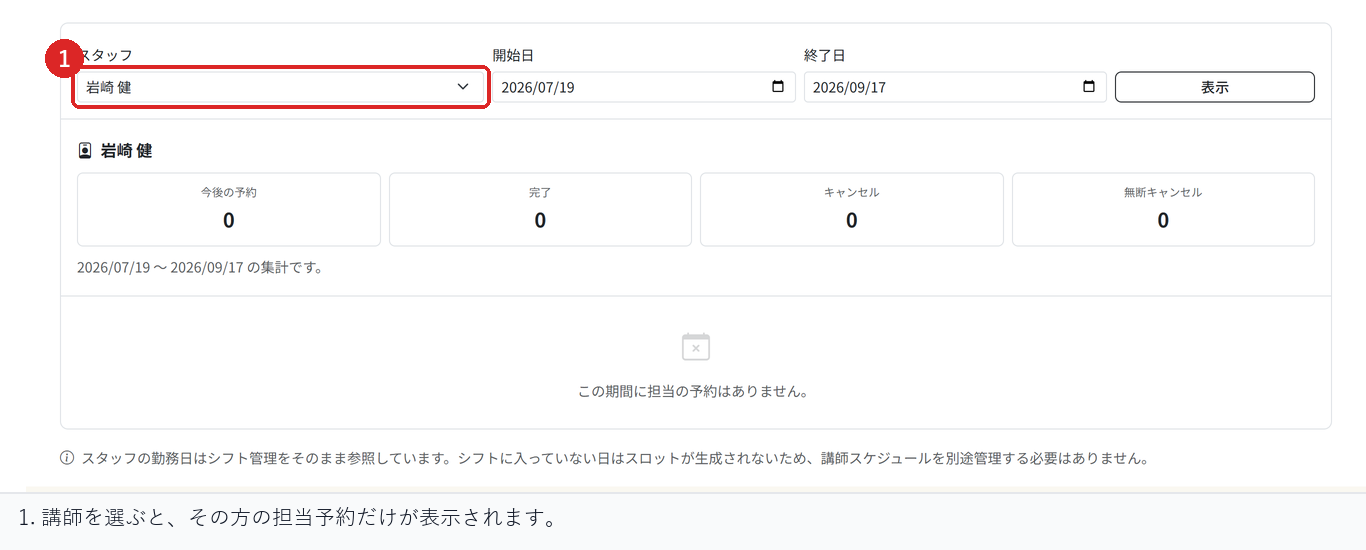
- Upcoming
- Completed
- Cancelled
- No-shows
About your existing custom fields
Custom fields in your reservation settings, such as "Stylist" or "Instructor", keep working as before. Once you start using staff as booking slots, the staff slot becomes the official record of who served the customer.
Related articles
-
Booking Menus and Service DurationsHow to set a duration for each booking menu item so customers are only offered times when that much time is free in a row. Covers buffer time, choosing which staff can take an item, visibility (Public, Link only, Members only) and who counts as a member.
-
Editing the Booking PageHow to edit the welcome message, cancellation policy and notes shown on your customer-facing booking page, where each one appears, and what to write to cut down on questions.
-
Charging No-Show FeesHow to charge a cancellation fee to customers who do not show up. Covers the card-on-file setting, when the charge is made, and why a charge may not go through.
-
Staff Nomination SettingsHow to let customers choose a staff member before they book. Covers adding a nomination fee, what customers see on the booking page, and why staff must be registered first.
-
Setting Up Deposits and PrepaymentHow to take a deposit or full prepayment at the time of booking. Covers the four payment options, the Stripe connection you need first, what customers see, and what to check before you go live.