Setting Up Recurring Bookings
For customers who come regularly, such as "every Tuesday at 7 pm", you can create all their bookings with a single registration. You no longer need to re-enter them by hand each week, and you avoid forgetting one.
Before you register
Recurring bookings are made against booking slots you have already created. Create the slots for the period first in "Slot management". No booking is made on a day without a slot.
Because of this, bookings are never added on their own to days you have cancelled classes, or to future dates you have not created slots for yet.
Registering a recurring booking
Register it from the "Passes, memberships & series" screen in Reservations.
- Customer name, phone and email
- Day and start time: must match the start time of a booking slot
- Party size
- Start date and end date: you can leave the end date blank
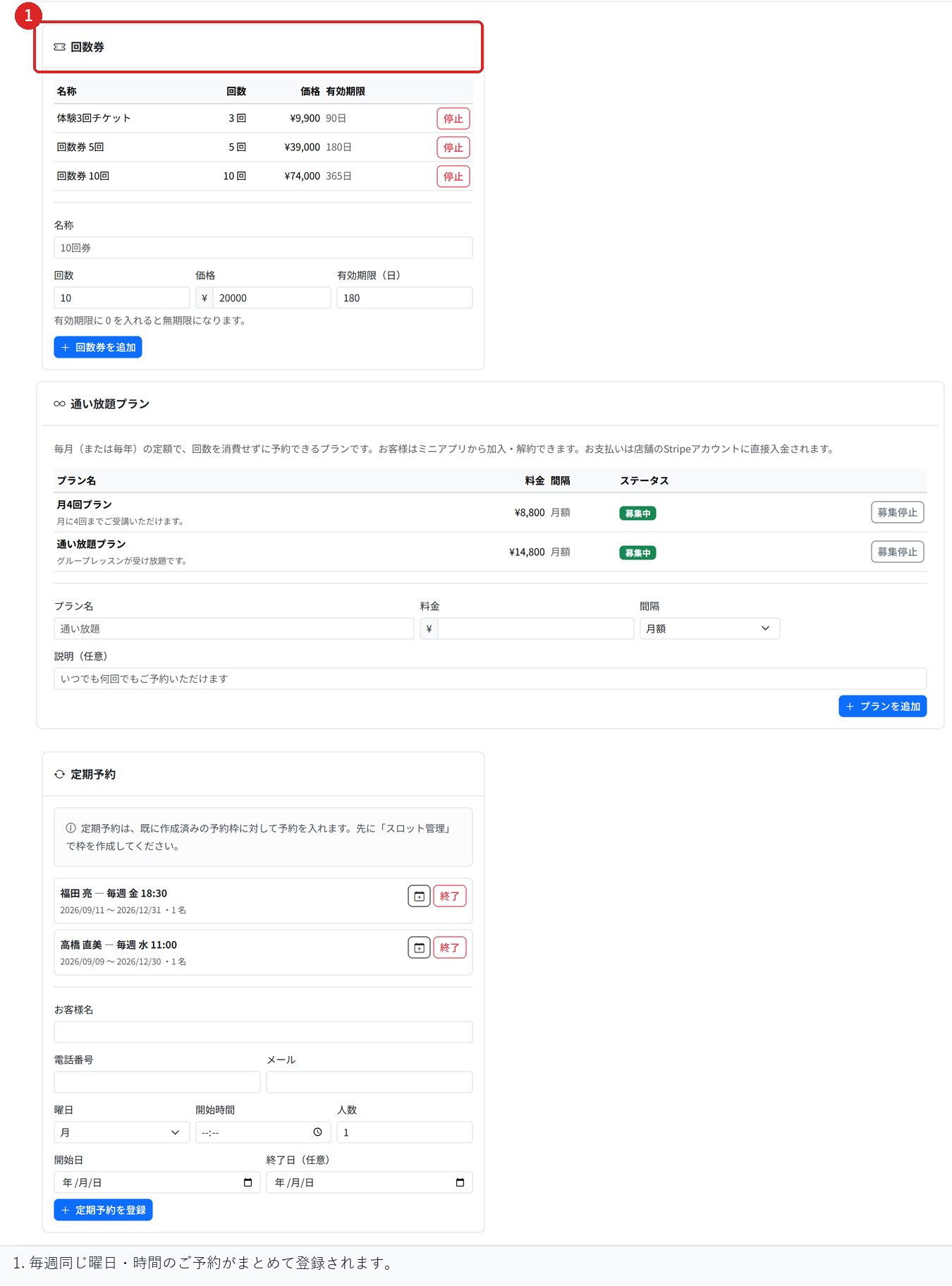
When you register, bookings are made for the next 90 days against the slots that exist at that point. Only one booking is made per day. The result shows how many bookings were made, and if any dates could not be booked because they were full, it shows how many as well.
Adding bookings for a later period
After you create slots for a later period, press the calendar button ("Book the next 90 days") on the recurring booking, and all the dates that can be booked at that point are added. Dates that are already booked are not added twice.
Ending a recurring booking
Press "End" to stop the recurring booking. In the confirmation, choose "OK" to also cancel all upcoming bookings, or choose "Cancel" to end only the recurring booking and keep the existing bookings.
Either way, sessions that have already taken place are not changed.
How this works with session passes
Bookings made by a recurring booking use one session pass credit each, just like normal bookings. Cancelling returns the credit.
Related articles
-
Setting Up Unlimited PlansHow to set up a flat monthly or yearly plan that lets subscribers book without using pass credits. Covers how it differs from session passes, joining and cancelling, and closing a plan to new members.
-
Creating and Running Session PassesHow to create session passes such as a 10-session pass, let customers buy them, and use up one credit per booking. Also covers setting an expiry and how credits are returned on cancellation.
-
How to Read the Store DashboardHow to read the Store Dashboard, which shows all your stores, and Store Details, which shows one store: today's sales and bookings, and where each feature lives.
-
Moving from Another System (CSV Import)How to import your member list and remaining session pass credits from another system. Covers the check-then-import flow, how rows are matched to existing customers, and why you should not import the same file twice.
-
Automatically Holding the Half-Turn Tee TimeHow to hold the IN tee time at the same time as the OUT start slot, covering course pairings, the time between halves, and what happens when the second half cannot be held.