Setting Up Unlimited Plans
You can sell a plan that lets customers book as often as they like for a flat monthly or yearly fee, without using up credits. Customers join and cancel from the mini app, and payments go straight into your store's Stripe account.
How it differs from session passes
- Session pass: one credit is used for each visit. When the credits run out, the customer can no longer book.
- Unlimited plan: the customer can book as often as they like until the period ends. No credits are used.
You can sell both at the same time. When a subscriber to an unlimited plan also holds a session pass, the pass is not used.
Registering a plan
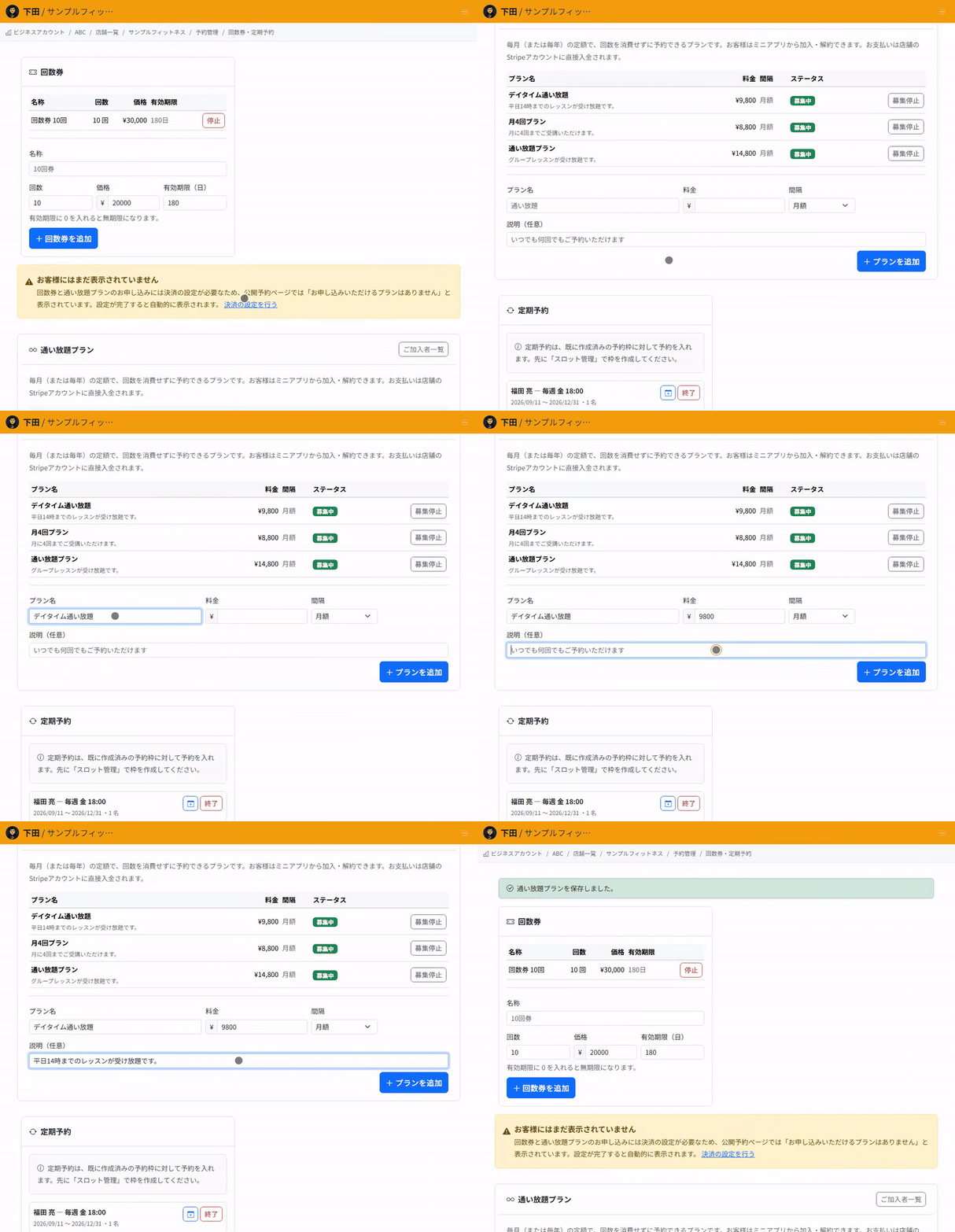
- In Reservations, choose "Passes, memberships & series".
- In the "Unlimited plans" section, enter a plan name.
- Enter the price.
- Choose the interval: monthly or yearly.
- Enter a description. This is optional.
- Select "Add plan".
Stripe must be set up first
To receive recurring payments, your business account must have finished connecting Stripe. Until the connection is complete, customers cannot go through the joining process.
When a customer cancels
Cancelling does not stop the customer from booking right away. Their membership continues until the end of the period they have paid for.
Bookings they have already made are not cancelled either.
Closing a plan to new members
To stop taking new subscribers, select "Close to new members". Customers who have already subscribed keep their membership.
Plans are closed to new members rather than deleted so that current subscribers are not affected.
What to check before you start
Register one monthly plan and check that you can go through the joining process from the mini app. After joining, check that you can book without using a session pass.
After selecting "Close to new members", also check that no one new can join and that current subscribers can still book.
Related articles
Creating and Running Session Passes / Setting Up Recurring Bookings / Recording Attendance and Makeups
-
Creating and Running Session PassesHow to create session passes such as a 10-session pass, let customers buy them, and use up one credit per booking. Also covers setting an expiry and how credits are returned on cancellation.
-
How to Read the Store DashboardHow to read the Store Dashboard, which shows all your stores, and Store Details, which shows one store: today's sales and bookings, and where each feature lives.
-
Moving from Another System (CSV Import)How to import your member list and remaining session pass credits from another system. Covers the check-then-import flow, how rows are matched to existing customers, and why you should not import the same file twice.
-
Setting Up Recurring BookingsHow to register bookings for the same day and time each week, such as every Tuesday at 7 pm, in one go. Also covers how days without slots are skipped and what happens when you end a recurring booking.
-
Automatically Holding the Half-Turn Tee TimeHow to hold the IN tee time at the same time as the OUT start slot, covering course pairings, the time between halves, and what happens when the second half cannot be held.