Automatically Holding the Half-Turn Tee Time
When a booking takes an OUT start slot, the IN tee time can be held at the same time. Use this when, as at a golf course, players move from a front-half course to a back-half course. It is turned off by default.
How to set it up
- In Reservations, open "Setup" and choose "Reservation settings".
- Open "Basic settings" on the "Hours & slots" tab.
- Turn on "Hold the turn as well".
- In "First half to second", enter the time for the first half in minutes. This is the time it takes to play the front nine plus the break at the turn.
- Enter the "Course pairing".
- Select "Save" at the bottom of the screen.
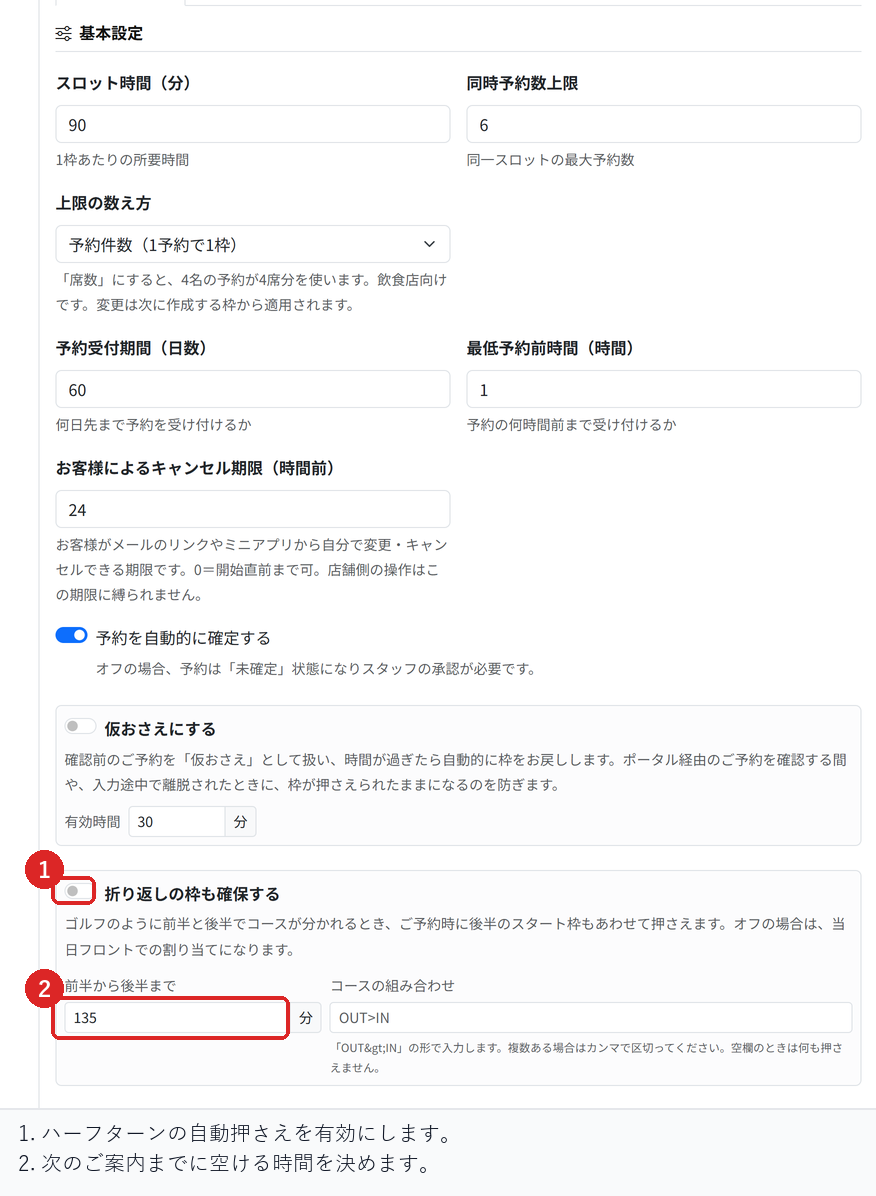
How to write a course pairing
Enter which course players move from and to in the form "OUT>IN". If you have more than one pairing, separate them with commas.
If you leave it blank, nothing is held. If we guessed the pairing and held a different course, your customers would only find out at the turn, so in this case nothing happens on purpose.
When the second half cannot be held
In the following cases, the second-half slot is not held, and the booking is accepted with the first-half slot only.
- No course pairing has been set
- The chosen course is not registered as the first half of a pairing
- The matching second-half slot does not exist
- The second-half slot is already taken
In every case, the rule is that holding nothing is better than holding the wrong tee time. Handle the second half at the front desk on the day.
How this works with holding only the start slot
In golf, the next group starts a few minutes later. In this case, also turn on "Hold only the start slot" on the reservation menu. Customers are still told the duration, but only the one slot at the start time is held.
What to check before you start
Register one pairing, make a booking on the front-half course, and check on the timeline that the second-half slot is held as well.
Also fill the second-half slot in advance, make the same booking, and check that only the first half is held. Then check that nothing is held when the course pairing is left blank.
Related articles
Booking Menus and Service Durations / Closing Slots in Bulk and Pushing Back Start Times / Using the Timeline
-
Setting Up Unlimited PlansHow to set up a flat monthly or yearly plan that lets subscribers book without using pass credits. Covers how it differs from session passes, joining and cancelling, and closing a plan to new members.
-
Creating and Running Session PassesHow to create session passes such as a 10-session pass, let customers buy them, and use up one credit per booking. Also covers setting an expiry and how credits are returned on cancellation.
-
How to Read the Store DashboardHow to read the Store Dashboard, which shows all your stores, and Store Details, which shows one store: today's sales and bookings, and where each feature lives.
-
Moving from Another System (CSV Import)How to import your member list and remaining session pass credits from another system. Covers the check-then-import flow, how rows are matched to existing customers, and why you should not import the same file twice.
-
Setting Up Recurring BookingsHow to register bookings for the same day and time each week, such as every Tuesday at 7 pm, in one go. Also covers how days without slots are skipped and what happens when you end a recurring booking.