Charging No-Show Fees
You can have customers save only their card details, and charge a cancellation fee if they do not show up. Rather than taking money in advance, the card is charged only when it becomes necessary.
Two settings are needed first
- On the "Pricing & payment" tab of Reservation settings, set the payment option to "Card on file only (charged on no-show)".
- On the same tab, enter an amount in "No-show fee". If you leave it at 0, nothing can be charged.
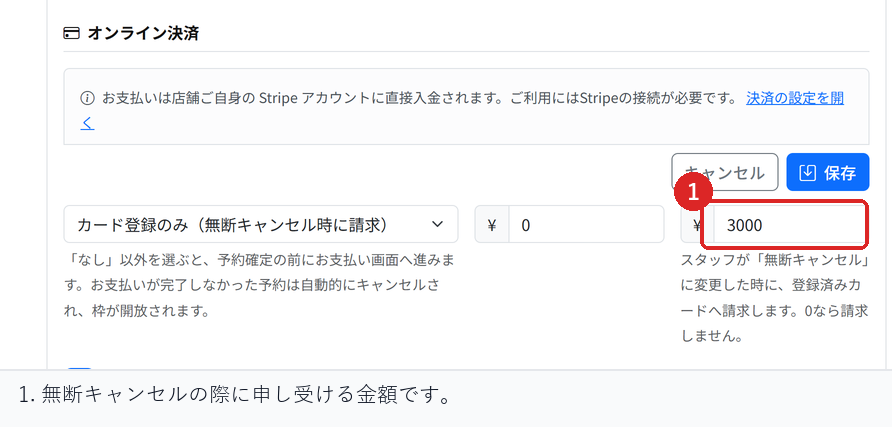
After this, customers go on to a card registration page when they book. The booking is confirmed once the card is registered.
How to charge the fee
- In Reservations, open "Reservation list" and select the booking.
- In the reservation detail, select "Mark no-show".
- The status changes to no-show and the cancellation fee is charged at the same time.
The result of the charge is shown on screen. If it succeeds, the amount is recorded in the reservation detail.
When the fee cannot be charged
In the following cases nothing is charged, and the reason is shown on screen.
- The customer has not registered a card
- The fee has already been charged
- Your business account has not finished connecting to Stripe
- The card issuer requires the customer to approve the payment
In the last case, the customer is not there to approve it, so the charge cannot go through. Check the message shown and contact the customer directly from your store.
What happens when a customer does not show up
When you mark a booking as a no-show, the slot becomes available again. Because this happens right before the booking time, the slot is not offered to customers on the waitlist.
For bookings that use a multi-visit pass, a no-show does not give the visit back, because the place was held for the customer. If there were unavoidable circumstances, consider treating it as a transfer from the attendance record.
Checks before you go live
Make a test booking through to card registration, mark it as a no-show, and confirm that the charge is made and the amount is recorded in the reservation detail.
Also try the same steps on a booking without a card, and confirm that nothing is charged and a reason is shown.
Related articles
Setting Up Deposits and Prepayment / Refunds on Cancellation / Recording Arrivals
-
Booking Menus and Service DurationsHow to set a duration for each booking menu item so customers are only offered times when that much time is free in a row. Covers buffer time, choosing which staff can take an item, visibility (Public, Link only, Members only) and who counts as a member.
-
Editing the Booking PageHow to edit the welcome message, cancellation policy and notes shown on your customer-facing booking page, where each one appears, and what to write to cut down on questions.
-
Staff Nomination SettingsHow to let customers choose a staff member before they book. Covers adding a nomination fee, what customers see on the booking page, and why staff must be registered first.
-
Setting Up Deposits and PrepaymentHow to take a deposit or full prepayment at the time of booking. Covers the four payment options, the Stripe connection you need first, what customers see, and what to check before you go live.
-
Refunds on CancellationHow payments taken in advance are refunded when a booking is cancelled. Covers the difference between customer and store cancellations and what to do after the cancellation deadline.