Setting Up Room and Rental Stock
Once you register room types or rental items, you can take bookings that span more than one day. Stays are counted in nights and hires are counted in days. Because this difference changes how stock is handled, you set it for each item.
How to register an item
- In Reservations, open "Setup" and select "Rooms & rentals".
- Select "Add".
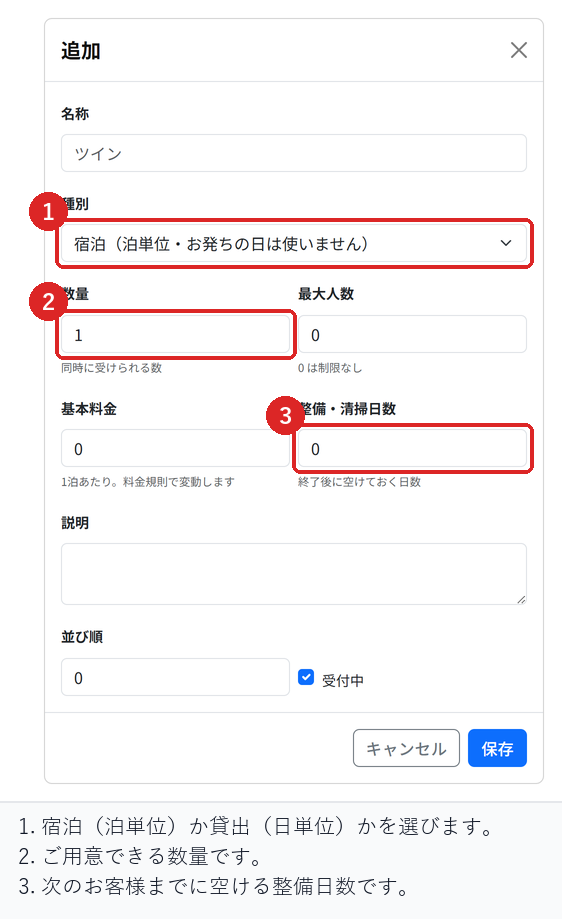
- Enter a "Name". This is the name customers see, such as Twin, Japanese-style room, or Rental bicycle.
- Choose a "Type": either "Stay" or "Hire".
- Enter a "Quantity". This is how many you can accept at the same time.
- Select "Save".
The difference between stays and hires
- Stay: counted per night, and the stock comes back on the day of departure. A guest who arrives on 3/1 and leaves on 3/4 stays 3 nights, and the next guest can stay from 3/4.
- Hire: counted per day, and the return day also uses stock. An item lent on 3/1 and returned on 3/3 is a 3-day hire.
If you mix these up, you may lend the same item to someone else on its return day. Always check the type.
Maximum guests and base price
If you set "Maximum guests", bookings for more people than that are not accepted. Leave it at 0 for no limit.
The "Base price" is the amount per night or per day. If you have set pricing rules, they apply date by date, so even when the season changes partway through a stay, each night is priced separately. If you charge by number of guests × number of nights, that multiplication is applied too.
Turnaround days
You can set a number of days to keep free after check-out or return. Even for items that need cleaning or inspection, the next booking will not overlap.
If you leave it at 0, the next booking can follow straight away.
What to do after registering
Registering an item alone does not let you take bookings yet. You also need to generate the inventory calendar. Days without inventory look fully booked to customers.
Checks before you go live
Register a stay item and confirm that a booking from 3/1 to 3/4 is calculated as 3 nights, and that you can accept another booking starting on 3/4.
Try the same dates with a hire item as well, and confirm that it is calculated as 3 days and that no other booking can be accepted on the return day.
Related articles
Generating the Inventory Calendar / Setting Up Deposits and Prepayment / Creating Reservations and Acceptance Settings
-
Booking Menus and Service DurationsHow to set a duration for each booking menu item so customers are only offered times when that much time is free in a row. Covers buffer time, choosing which staff can take an item, visibility (Public, Link only, Members only) and who counts as a member.
-
Editing the Booking PageHow to edit the welcome message, cancellation policy and notes shown on your customer-facing booking page, where each one appears, and what to write to cut down on questions.
-
Charging No-Show FeesHow to charge a cancellation fee to customers who do not show up. Covers the card-on-file setting, when the charge is made, and why a charge may not go through.
-
Staff Nomination SettingsHow to let customers choose a staff member before they book. Covers adding a nomination fee, what customers see on the booking page, and why staff must be registered first.
-
Setting Up Deposits and PrepaymentHow to take a deposit or full prepayment at the time of booking. Covers the four payment options, the Stripe connection you need first, what customers see, and what to check before you go live.