Reservation Notifications and Customer Reminders
In reservation management, you can use reservation confirmation emails, pre-visit reminders, and cancellation notifications. Check the status of email notifications and adjust the reminder send timing or email body as needed.
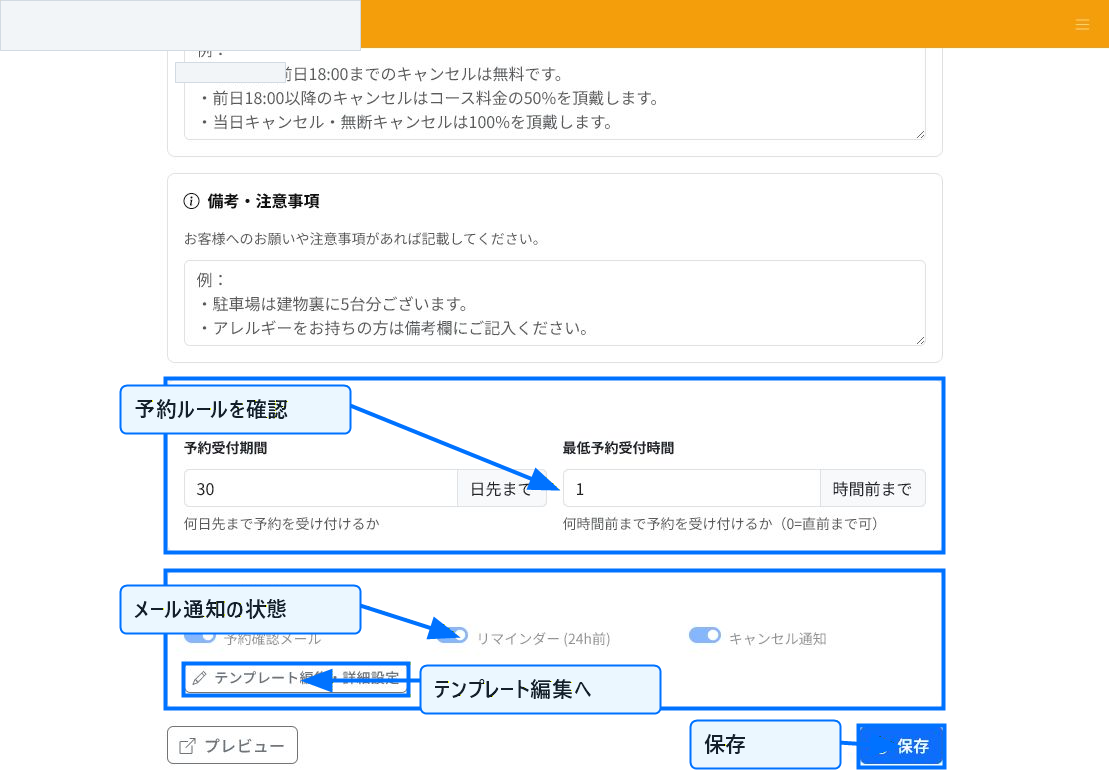
Check the Status of Email Notifications
On the reservation page edit screen, you can check the status of reservation confirmation emails, reminders, and cancellation notifications, along with the reservation acceptance period and minimum reservation lead time.
To change the notification text or reminder details, go to the email template screen from "Edit Template / Detailed Settings." Changes take effect once saved.
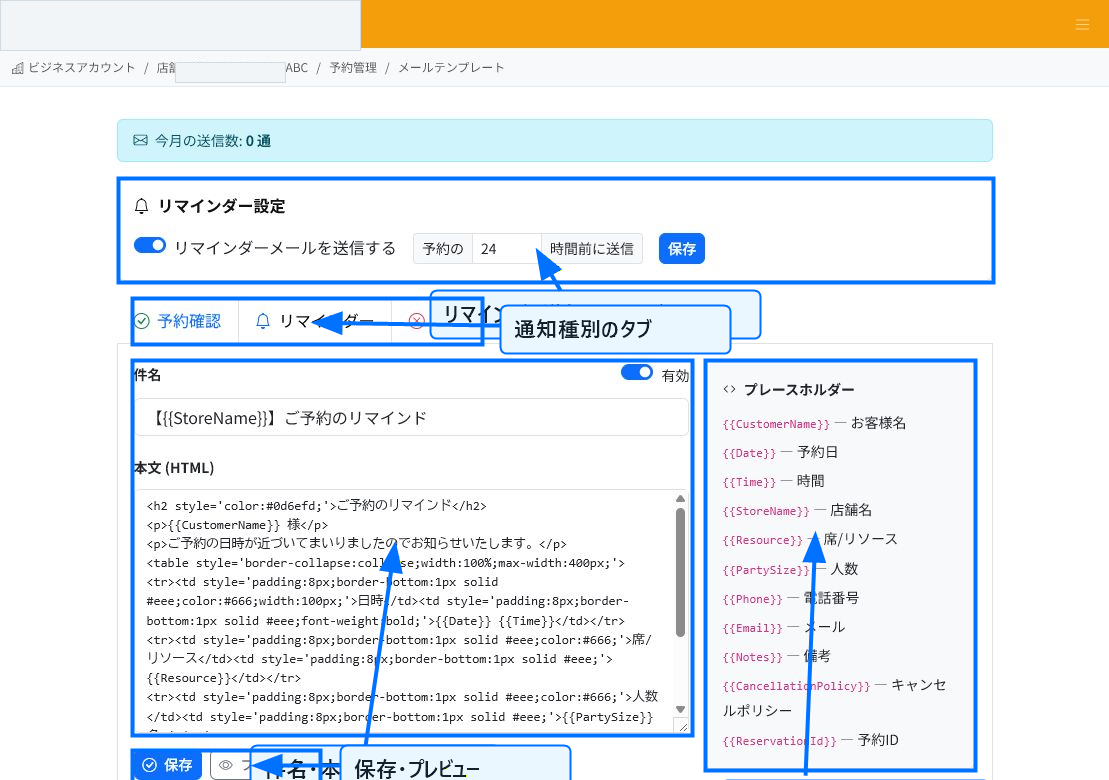
Set Up Reminders and Templates
On the email template screen, you can set whether to send reminder emails and how many hours before the reservation to send them. For example, if you send it 24 hours in advance, it will automatically notify the customer the day before.
Switch between the reservation confirmation, reminder, and cancellation tabs to edit the subject and body for each. You can also toggle each template on or off.
Items You Can Use in Templates
You can use placeholders in the body text. Items such as customer name, reservation date, time, store name, seat or resource, party size, phone number, email, notes, cancellation policy, and reservation ID are replaced with actual values at the time of sending.
After editing the body, check the display in preview before saving. When editing the HTML body, please make sure links, line breaks, and tables are not broken.
Points for Managing Notifications
Reminders are effective for reducing no-shows. Set the timing to match your store's operations — for example, 24 hours in advance for restaurants and walk-in reservations, or the day before or several days before for beauty, medical, or long-duration menu bookings.
If you use cancellation notifications, keep the reservation page's cancellation policy up to date as well, so the content communicated to customers stays consistent.
Related Articles
Creating Reservations and Acceptance Settings / Reservation Cancellations and Changes
-
Creating Reservations and Acceptance SettingsExplains, with annotated screenshots, how staff register reservations, configure acceptance rules and slot duration, prepare available slots, and set up the customer-facing reservation page.
-
Checking the Reservation CalendarExplains, with annotated screenshots, how to check reservation status using the dashboard, timeline, and reservation list, including date navigation, availability legend, and filtered search.
-
What Is Reservation ManagementAn overview of ReceiptRoller's reservation management feature. Explains the basics of how staff register bookings, view the timeline, and send automatic notifications.
-
Reservation Cancellations and ChangesExplains, with annotated screenshots, how to cancel, complete, or mark reservations as no-show cancellations, and how to handle date/time changes.
-
Analyzing Reservation DataExplains, with annotated screenshots, how to read the reservation dashboard statistics, narrow down the reservation list, and check cancellations and no-show cancellations.