Bulk Setting Cost Prices (CSV)
You can set product cost prices in bulk using a CSV file. Registering cost prices lets you check gross profit and gross margin in per-product sales analysis, and use that data for profit-focused analysis and AI advice.
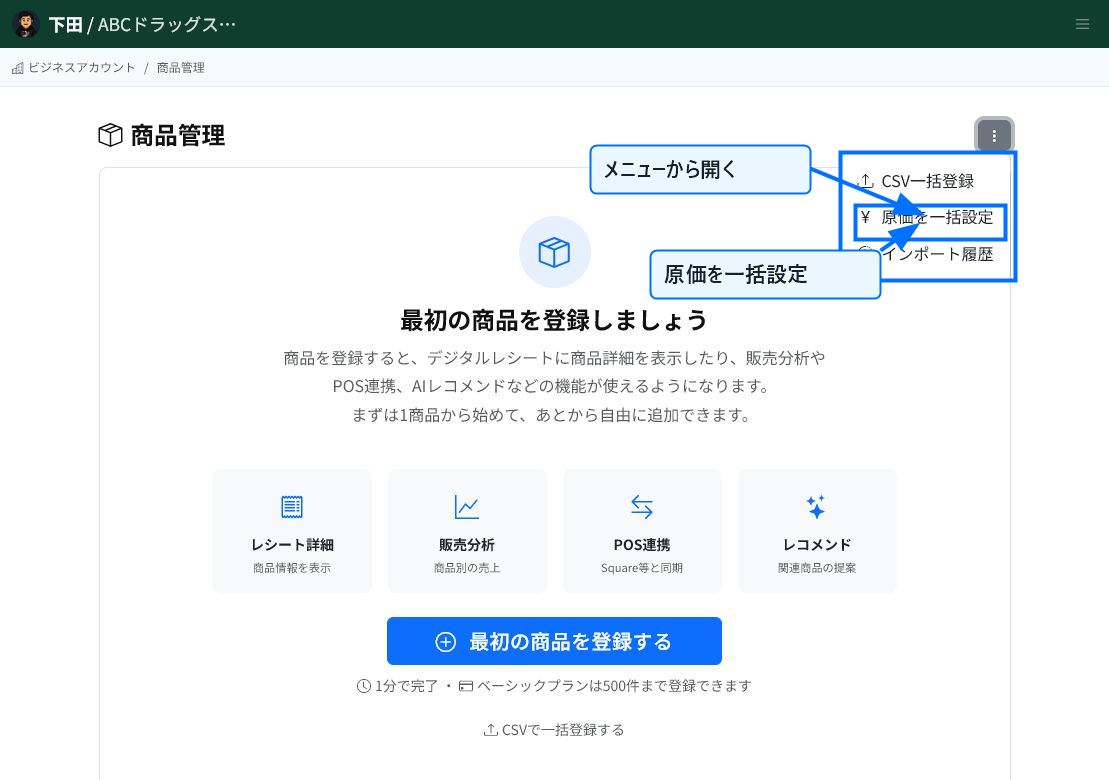
Open Bulk Set Cost Prices from product management
Select "Bulk Set Cost Prices" from the menu at the top right of the product management screen. If you only want to update cost prices for multiple products in one go, this screen is more efficient than the bulk product CSV upload.
You can generate a template based on your existing product list, which reduces input mistakes with ProductId or product names.
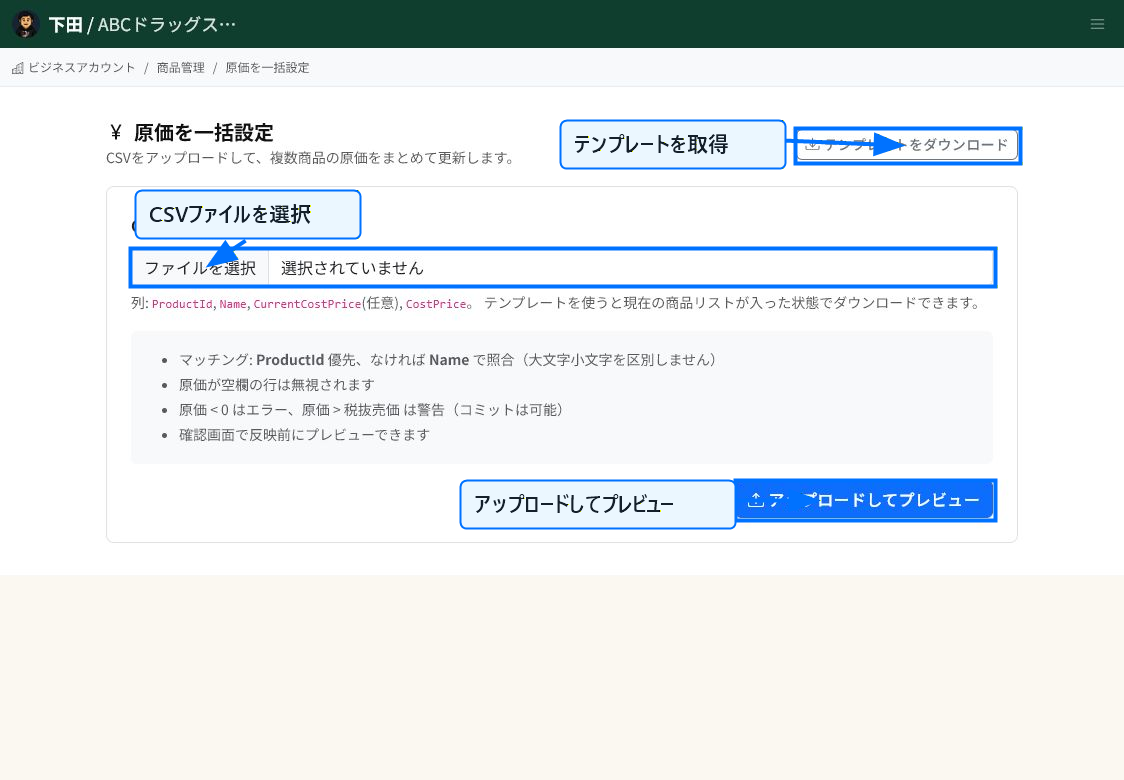
Enter the new cost prices into the template
Click "Download Template" to get a CSV containing your current product list. Enter the new cost price in the CSV's CostPrice column and save it.
Select the CSV file and run "Upload and Preview" to check the contents before anything is applied. Product data is not updated yet at this point.
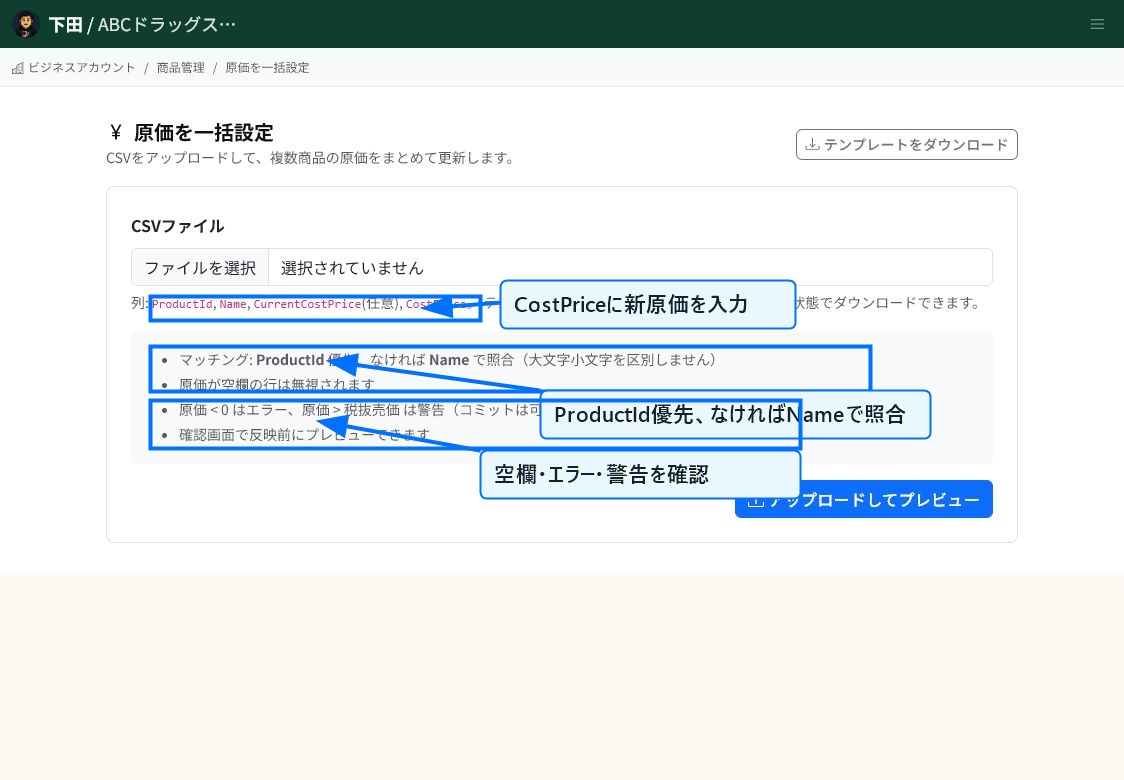
Check the matching rules and warnings
The CSV matches products by ProductId first. If ProductId is blank or doesn't match, it matches by the product name in the Name column. Rows with a blank cost price are excluded from the update.
A cost price below 0 is an error. A cost price higher than the tax-excluded selling price is shown as a warning. Warnings can still be applied after you've reviewed them.
What to check in the preview
The confirmation screen after uploading shows the number of rows to be updated, unchanged, not applicable, warnings, and errors. Check that products are matched to the intended rows and that the CostPrice values are correct.
If there are errors, fix the CSV and upload it again. If there are warnings, check whether it's acceptable for the cost price to exceed the selling price for that product.
Checking after applying
Once you confirm, the products' cost prices are updated and reflected in per-product sales analysis and gross margin calculations. Open a representative product afterward and check that the cost price and profit margin are what you expect.
Related articles
-
What is Product Information Management (PIM)?An overview of ReceiptRoller's PIM (Product Information Management) feature. Explains centralized product data management, variations, search, and Square integration.
-
Updating Product InformationHow to edit and update registered products. Explains basic information, images, pricing, variations, store-specific pricing, and bulk CSV updates, with screenshots.
-
Registering Product InformationSteps for registering a new product. Explains basic information, pricing, specifications, B2B/logistics information, variations, and store-specific pricing, with screenshots.
-
Product Category ManagementHow to set up product categories. Explains the category field on the product form, hierarchical notation (Food | Beverages | Tea), bulk CSV updates, and naming conventions, with screenshots.
-
Product Performance AnalysisHow to use product-level sales analysis. Explains date-range filtering, category/search/sorting, AI advice, ABC analysis, gross margin, and PIM integration, with screenshots.