What You Can Do with ReceiptRoller
ReceiptRoller is a service for keeping all the receipts from your everyday shopping in one place. Receive e-receipts, take photos of paper receipts, and import bank and credit card statements, and you can see all your spending on one screen.
Receive e-receipts
At stores that support ReceiptRoller, you get an e-receipt just by showing your code at checkout. You do not need to take a paper receipt home, and you can check it any time later.
Scan paper receipts
Receipts from stores that do not support ReceiptRoller can be photographed with your camera. The store name, date, total, consumption tax and items are read automatically, a category is chosen from your own categories, and the receipt is registered. You can correct what was read before registering. These receipts appear in the same list as your e-receipts.
Organize with categories and labels
You can add your own categories and change their names and colors. Add labels such as "Business trip" or "Family" to filter the list later.
Import bank and credit card statements
You can import a screenshot of the statement screen in your banking or credit card app. Fixed costs and online payments that do not come with a receipt can be managed in the same place.
Review your spending as a household budget
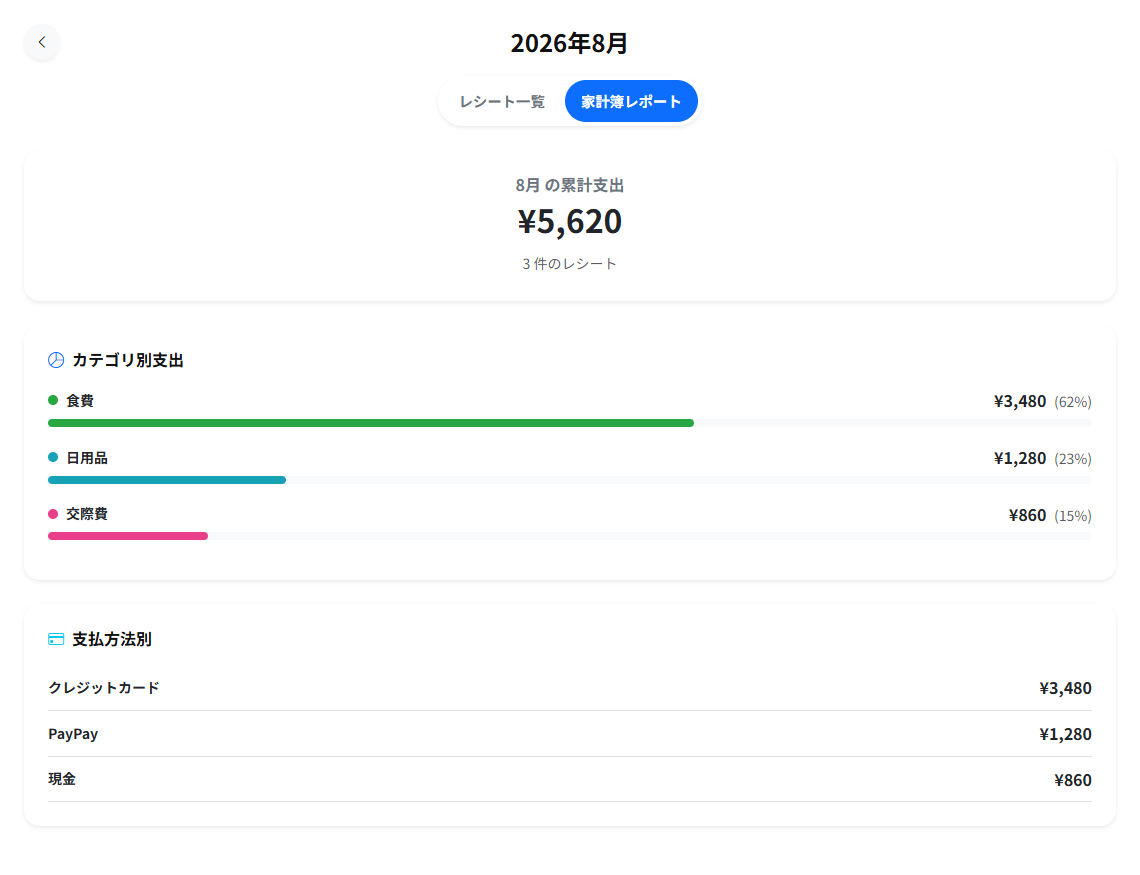
The spending you add is automatically totaled for the month and by category. You can see what you spent and on what, without doing the math yourself.
Coupons and favorite stores
Add stores you visit often to your favorites to receive coupons from those stores.
Use it on LINE, iOS, Android or a browser
You can use ReceiptRoller as a LINE mini app, as an iOS app, as an Android app, or in a browser. Choose whichever suits you. What you can do differs slightly depending on which one you use. For the LINE mini app, see Using ReceiptRoller on LINE.