Customizing Content Per Platform
Since character limits and appearance differ by platform, adjusting your post content for each destination makes it easier for your message to come across. On the post creation screen, you can check the character limit and preview for the channel you selected.
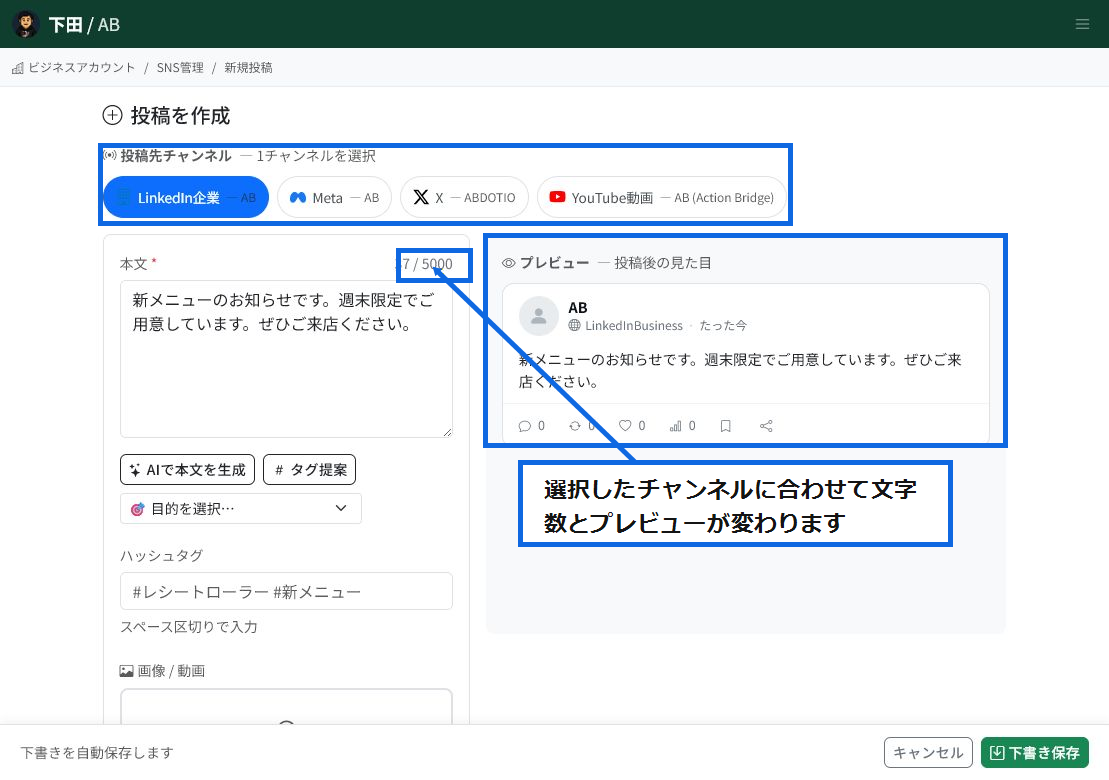
Check content for each destination
When you select a destination channel, the character limit and preview for that channel are displayed.
- The selected channel is highlighted in blue.
- The body character count is shown against the destination's limit.
- You can check how the post will look after publishing in the preview on the right.
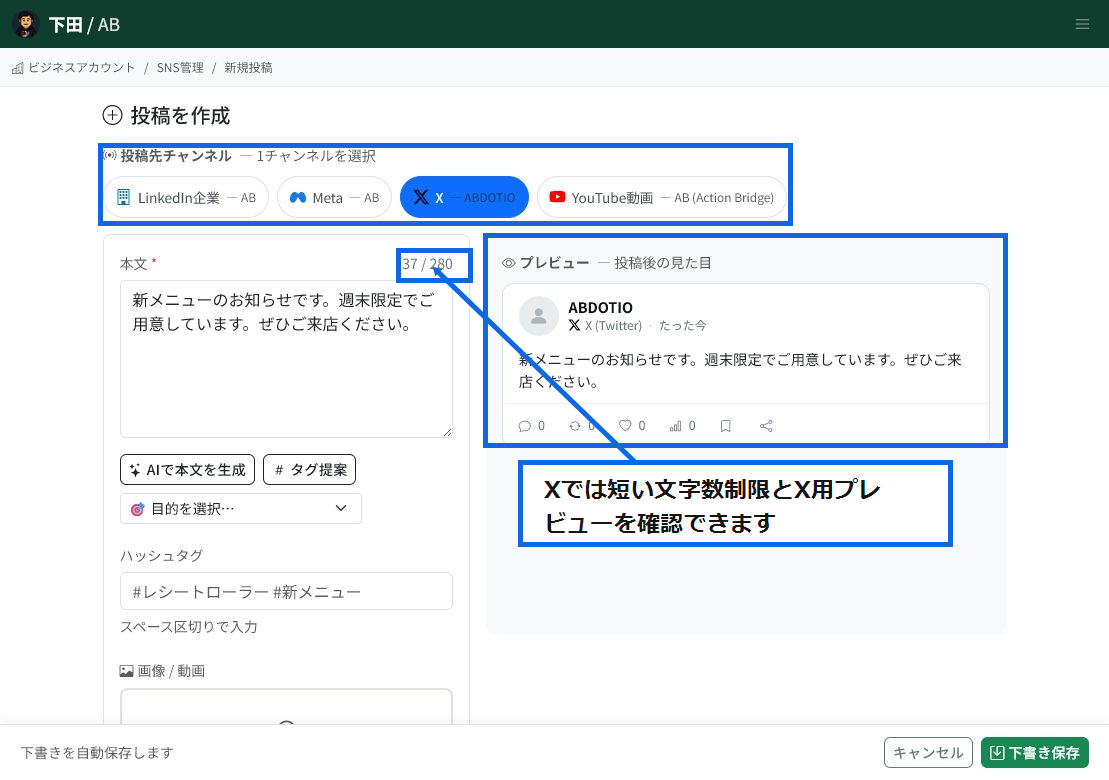
Check channels with short-form limits
For channels with short character limits, like X, you need to keep the body brief.
- On X, you can check the body against its short character limit.
- Body text that is too long will be flagged before you post.
- Adjust the length, including hashtags, to keep it readable.
Why customize
- X: Best suited for conveying key points concisely.
- Instagram: Best suited for posts that make use of photos and hashtags.
- LinkedIn: Best suited for conveying content in a business-appropriate tone.
- LINE: Best suited for conveying content in a friendly, approachable way to customers.
- YouTube: Create with the video title and description in mind.
Customization steps
- On the post creation screen, select the channel you want to publish to.
- Check the character limit for the selected channel.
- Enter the body text, hashtags, and images or video.
- After checking the appearance in the preview, save as a draft or publish.
AI-generated body text
Using "Generate body text with AI" lets you create a body text draft suited to your purpose. After generating, adjust it to match the character limit and tone of the selected channel.
Tag suggestions
Using "Suggest tags" lets you check hashtag suggestions that fit your post content. It leaves only the tags needed to match each channel's culture and character limit.
Preview
Before publishing, you can check how the post will appear on the destination channel in the preview. If it exceeds the character limit or has media restrictions, adjust the content before posting.
Related articles
-
SNS Management OverviewAn overview of ReceiptRoller's SNS Management feature. Manage post management across 10 supported channels, the Creative Library, AI support, a unified inbox, Google Business Profile integration, and an analytics dashboard all in one place.
-
Connecting Instagram BusinessExplains how to connect an Instagram Business account to ReceiptRoller, including the required Facebook Page link and prerequisites.
-
Connecting a LINE Official AccountExplains how to connect a LINE Official Account to ReceiptRoller using a Messaging API channel's Channel ID and Channel Secret.
-
Creating and Publishing PostsHow to create SNS posts. Combine body text, images, videos, and hashtags, select the target accounts, and save as a draft or publish immediately. Supports images up to 5MB and videos up to 2GB, with chunked 8MB video uploads, progress display, cancellation, and automatic retry.
-
Connecting SNS AccountsA comprehensive guide to connecting SNS channels (X, Meta, Instagram, LINE, TikTok, YouTube, Google Business Profile, LinkedIn, Pinterest) with ReceiptRoller. See the individual articles for platform-specific steps.